How to apply / renew /access my membership?
Kindly follow this GUIDE to apply / renew and get access to your E-member card.

How to apply / renew /access my membership?
Kindly follow this GUIDE to apply / renew and get access to your E-member card.
How can I use E-Member at store?
Please present the QR code on E-Member Card upon payment.
You can click "My Member Card" to show the card image.
Then, please touch the image and show the QR code.
Can I renew my membership from E-Member Card?
Yes. You can renew your membership on/after 60 days before the expiry date from our member portal.
I am a KPC member and I have physical member card. Can I also use E-Member Card?
Yes. Kindly follow setup guide.
I cannot log-in to E-Member Card with my mobile number or email. How can I log-in?
Kindly refer to our Customer Service Counter in our stores
or email to our Customer Service Department at dubai@ae.bookskinokuniya.com
*Kindly indicate your membership number and email accounts/mobile number you registered.
How can I update my account information?
You can edit your profile from My Member Card - "More" menu at any time.
The change of email address and/or mobile number requires 2-step authentication.
I applied E-Member Card. Can I have physical member card as well?
Yes. Physical member cards can be issued. Kindly refer to our Customer Service Counter in our stores.
*Maximum of one physical card per member.
How can I enjoy member discount at Kinokuniya Webstore after apply?
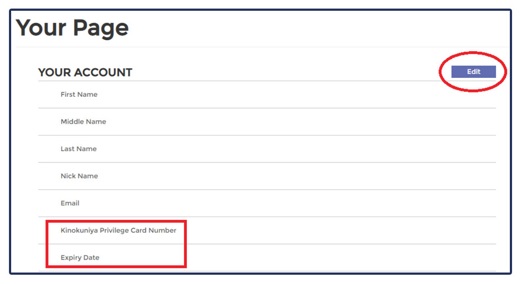
Kindy visit our UAE Webstore and login to "Your Account", register your card number & expiry date to enjoy member price.
When will I start to enjoy membership discount on my online purchases via Kinokuniya UAE Webstore?
You will be able to enjoy the privileges immediately upon receipt of application/renewal.
Am I able to use the Kinokuniya Privilege Card at Kinokuniya Book Stores outside of UAE?
No. You can only use it at Kinokuniya Book Stores Dubai, Abu Dhabi and Webstore UAE.